
How to Use Malayalam Alt Codes in MS Word (Legacy Font Guide)
In Malayalam Typing, many special characters are not directly available on the keyboard. To type these, users often use Alt Key combinations (Alt + XXXX), specifically for legacy fonts like ML-TTKarthika.
This guide explains how to find Malayalam Alt codes in MS Word using legacy fonts and character map settings.
Malayalam Alt codes are not universal. They only work with specific legacy fonts (Non-Unicode). For modern typing, download Unicode Malayalam Tools.
Steps to Find Malayalam Alt Codes in MS Word
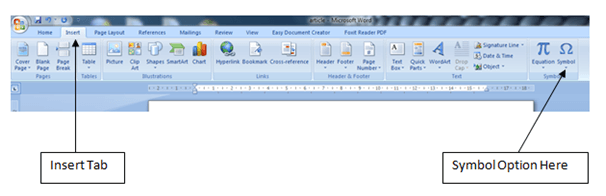
Step 1: Go to the Insert Tab in MS Word and click on the Symbol option at the far right.
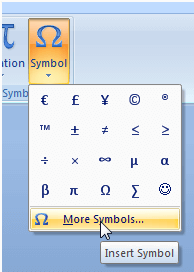
Step 2: Click on More Symbols to open the full character map window.
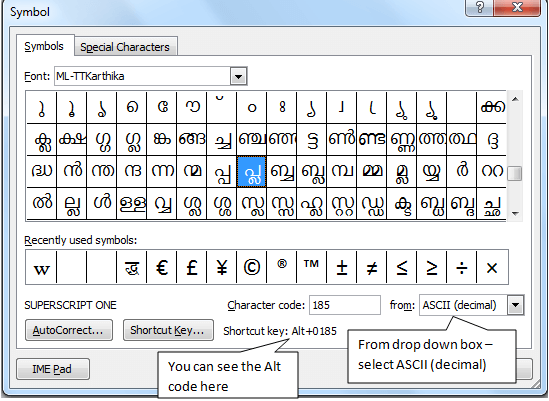
Step 3: Configure the Symbol window settings:
- Select a Malayalam legacy font (e.g., ML-TTKarthika).
- Change the "From" dropdown to ASCII (decimal).
- Select your character to see the Shortcut Key (Alt+0XXX) at the bottom.
How to Use the Code?
Hold the Alt key and type the 4-digit code (e.g., 0185) using the Numpad. Ensure Num Lock is ON.
Frequently Asked Questions (FAQs)
Do Malayalam Alt codes work in all fonts?
No, they only work with specific legacy fonts (like ML-TTKarthika or Kartika) and not with modern Unicode fonts like Meera or Rachana.
Can I use these codes on Mobile or WhatsApp?
No. For Mobile, WhatsApp, and Web, you must use Unicode Malayalam. Alt codes are strictly for desktop applications using legacy fonts.
Need to type in Unicode for Web/WhatsApp?
Use Malayalam Unicode Typing ToolDownload Malayalam Fonts | Fix Display Issues