
How to Fix Malayalam Font Display Issues
If Malayalam text is not displaying properly on your computer or browser (showing boxes, question marks, or garbage characters), don’t worry. This guide will help you fix all common Malayalam font display issues step-by-step.
This guide helps fix Malayalam font display issues in Windows 10, Windows 11, Chrome, Firefox, and Notepad for a perfect reading experience.
- Install Unicode Malayalam fonts (Meera, Rachana, etc.)
- Enable Malayalam keyboard in Windows settings.
- Set character encoding to UTF-8 (Unicode).
- Ensure you are using an updated version of Chrome or Firefox.
Why Malayalam Text Shows as Boxes or Symbols (Font Display Issue)?
This issue usually happens when your system lacks proper fonts or uses incorrect character encoding. To fix this, you must first install Malayalam fonts (Unicode) on your Windows system. When a computer doesn't recognize the Malayalam script, it displays "Tofu" (square boxes) or symbols instead.
1. Malayalam Text Not Showing in MS Word or Applications
Solution: Install Unicode Malayalam fonts on your system and enable Malayalam typing.
- Download fonts from our Malayalam fonts collection.
- Install the font (Double-click the .ttf file and click Install).
- Enable Malayalam keyboard or use our Malayalam typing tool.
- Select the installed font (e.g., Meera or Karthika) in your application.
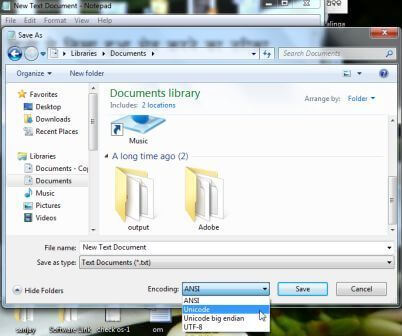
2. Malayalam Text Not Saving Properly in Notepad
Solution: Save your file with Unicode/UTF-8 encoding instead of ANSI.
Step: Click “Save As” and select Unicode (or UTF-8) in the encoding dropdown:
👉 Download proper Malayalam Unicode fonts to fix display issues instantly.
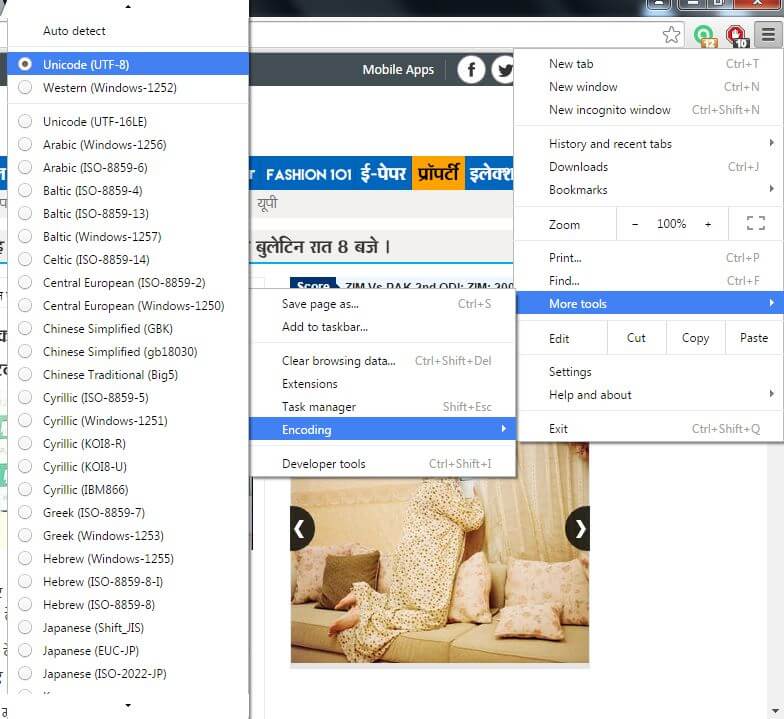
3. Malayalam Text Not Displaying in Google Chrome
Solution: Set browser encoding to UTF-8 to resolve character mismatches.
Go to Settings → More Tools → Encoding → Select Unicode (UTF-8).
4. Malayalam Text Not Displaying in Mozilla Firefox
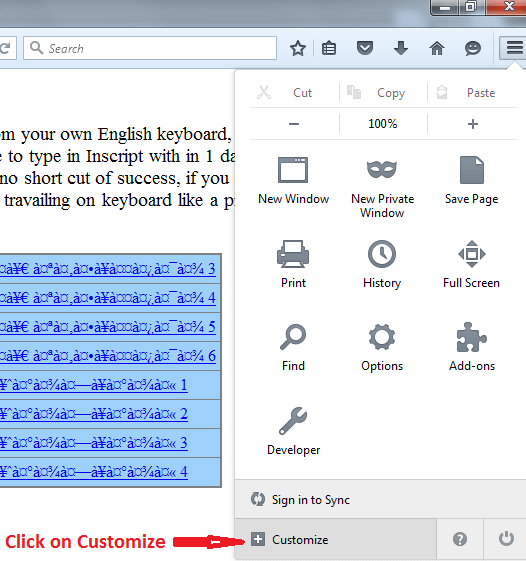
Solution: Enable the text encoding option from the customize menu.
1. Click Menu → Customize and drag the Text Encoding tool to your toolbar.
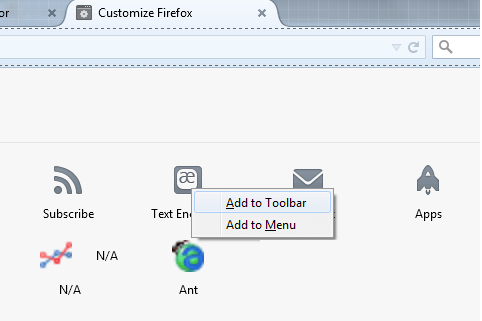
2. Click the tool and choose Unicode from the list.
💡 Important: Unicode vs Non-Unicode
Many users face display issues because they try to use Non-Unicode (Legacy) fonts for web browsing or social media.
Unicode fonts (like Meera, Rachana, Karthika) are the universal standard. They work perfectly on all modern browsers, WhatsApp, and Facebook. Non-Unicode fonts are strictly for offline design work in software like Photoshop or Flex printing.
👉 Use our Malayalam typing tool for perfect Unicode text.
Frequently Asked Questions (FAQs)
Why does Malayalam text show boxes or question marks?
Missing fonts or incorrect encoding (ANSI instead of UTF-8) are the main reasons for this issue.
Why Malayalam text shows squares in Chrome?
It happens due to wrong encoding or missing fonts. Set encoding to UTF-8 in Chrome settings and ensure Unicode fonts are installed on your Windows system.
How to enable the Malayalam keyboard in Windows?
Go to Settings → Language → Add Malayalam keyboard. Read our full guide: Enable Malayalam keyboard layout.
Useful Resources:
Download Malayalam Fonts • Malayalam Typing Test • English to Malayalam Translation